TLDR
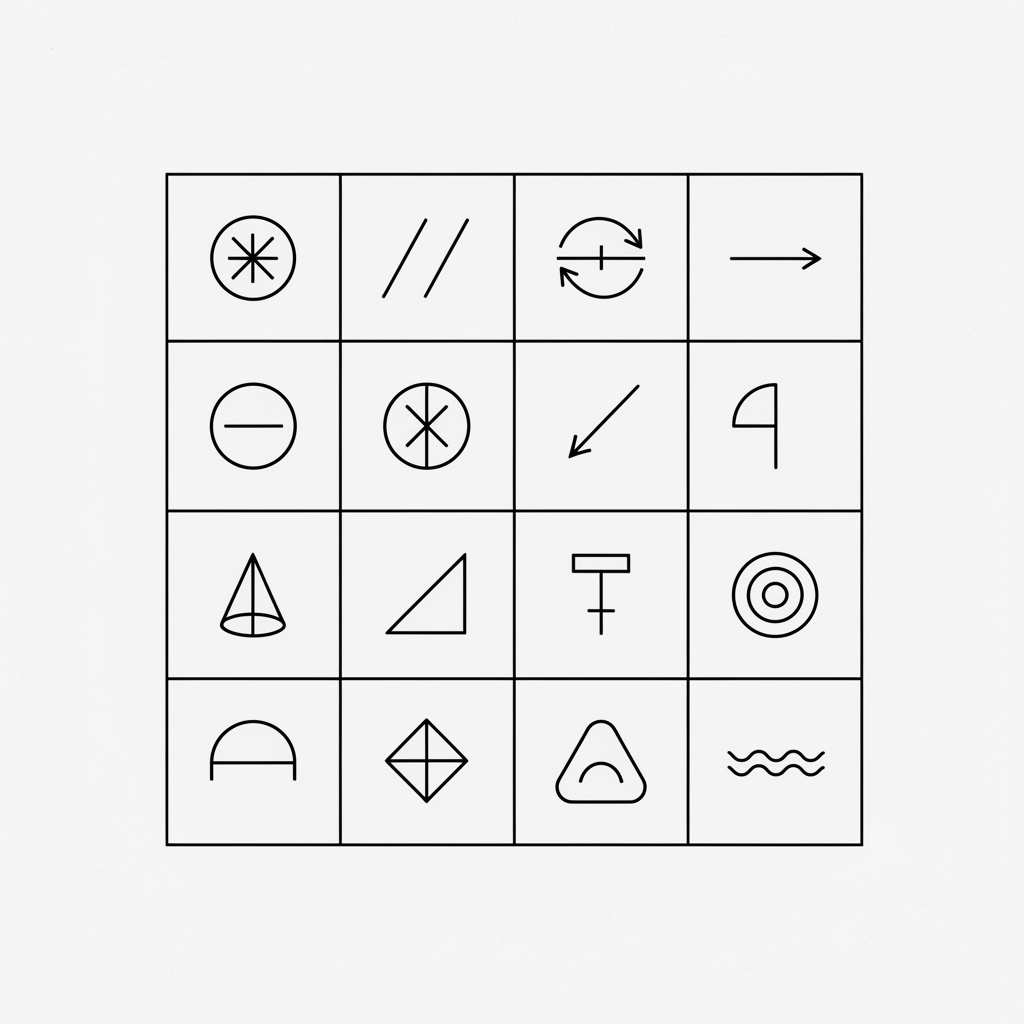
GD&T uses 14 geometric tolerance symbols divided into five categories: form, orientation, location, profile, and runout. Each symbol controls a specific aspect of a part’s geometry and communicates design intent far more precisely than plus/minus tolerancing alone.
This guide walks through every symbol with its meaning, category, when to use it, and a practical manufacturing example.
14 Symbols. One Language for Defining Part Geometry.
Every GD&T (Geometric Dimensioning and Tolerancing) callout on an engineering drawing starts with a symbol. That symbol tells you what type of geometric control is being applied to a feature. Miss the meaning of the symbol and you’ll misread the entire tolerance.
There are exactly 14 symbols defined in the ASME Y14.5 standard. They are grouped into five categories based on what aspect of geometry they control. Once you understand the categories, the individual symbols become much easier to learn and remember.
Below is each symbol, organized by category, with a clear explanation of what it does and where you’ll see it applied.
Category 1: Form Tolerances
Form tolerances control the shape of a single feature without reference to any other feature or datum. They answer the question: “Is this feature the correct shape?” No datum reference is required for any form tolerance.
1. Flatness (⏥)
What it controls: How flat a surface is. The tolerance zone is the space between two parallel planes.
When to use it: Sealing surfaces, gasket faces, mounting plates, and any surface that must mate flush with another component.
Example: A cylinder head gasket surface with a flatness tolerance of 0.05 mm. Every point on that surface must lie between two parallel planes spaced 0.05 mm apart.
2. Straightness (⏤)
What it controls: How straight a line element or axis is. Applied to a surface, it controls individual line elements. Applied to a feature of size (like a shaft), it controls the axis.
When to use it: Shafts that must slide through bearings, guide rails, and extrusions where bowing would cause functional problems.
Example: A 500 mm long guide rod with a straightness tolerance of 0.1 mm on its axis. The derived median line of the rod must fall within a cylindrical tolerance zone of 0.1 mm diameter.
3. Circularity (○)
What it controls: How close to a perfect circle a cross-section is at any given point along a cylindrical or spherical feature. Also called “roundness.”
When to use it: Bearing journals, piston bores, and any cylindrical feature where out-of-round conditions would cause vibration, leaking, or premature wear.
Example: A hydraulic cylinder bore with a circularity tolerance of 0.02 mm. At every cross-section, the surface must lie between two concentric circles whose radii differ by 0.02 mm.
4. Cylindricity (⌭)
What it controls: The combined roundness and straightness of an entire cylindrical surface. Think of it as circularity applied along the full length of a cylinder.
When to use it: Precision bore surfaces, hydraulic spool valve bores, and any cylinder where both cross-sectional roundness and longitudinal straightness matter.
Example: A fuel injector bore with a cylindricity tolerance of 0.01 mm. The entire surface must lie between two coaxial cylinders whose radii differ by 0.01 mm.
Category 2: Orientation Tolerances
Orientation tolerances control the angular relationship of a feature relative to a datum. They answer: “Is this feature tilted, perpendicular, or parallel as the design requires?” All orientation tolerances require at least one datum reference.
5. Perpendicularity (⟂)
What it controls: How close a feature is to being exactly 90 degrees relative to a datum. Can be applied to surfaces, axes, or median planes.
When to use it: Mounting bosses that must be square to a base, dowel pin holes perpendicular to a face, and walls that meet at right angles.
Example: A locating pin hole with a perpendicularity tolerance of 0.05 mm relative to datum A (the mounting face). The axis of the hole must fall within a cylindrical zone 0.05 mm in diameter that is perfectly perpendicular to datum A.
6. Parallelism (∥)
What it controls: How close a feature is to being exactly parallel to a datum. Applied to surfaces or axes.
When to use it: Opposite faces of a machined block, rails that must stay equidistant, and shafts that must remain parallel to a reference surface.
Example: The top surface of a valve body with a parallelism tolerance of 0.03 mm relative to datum A (the bottom surface). Every point on the top surface must lie between two planes 0.03 mm apart, both parallel to datum A.
7. Angularity (∠)
What it controls: How close a feature is to a specified angle relative to a datum. Works for any angle other than 0 or 90 degrees (those are covered by parallelism and perpendicularity).
When to use it: Chamfers, tapered bores, angled mounting surfaces, and V-block features.
Example: A bracket face angled at 45 degrees to the base with an angularity tolerance of 0.08 mm relative to datum A. The surface must lie between two parallel planes 0.08 mm apart, oriented at exactly 45 degrees to the datum.
Category 3: Location Tolerances
Location tolerances control where a feature is positioned relative to datums or other features. They answer: “Is this feature in the right place?” All location tolerances require datum references.
8. True Position (⊕)
What it controls: How close the actual location of a feature is to its theoretically exact position (defined by basic dimensions). This is the most commonly used GD&T symbol.
When to use it: Bolt hole patterns, pin locations, slot centers, and any feature where position relative to datums is the primary concern.
Example: A four-hole bolt pattern with each hole at true position within a diameter of 0.25 mm at Maximum Material Condition (MMC) relative to datums A, B, and C. The axis of each hole must fall within a 0.25 mm diameter cylindrical zone centered on the theoretically exact location.
9. Concentricity (◎)
What it controls: How close the median points of a feature of size are to the axis of a datum feature of size. It is a point-by-point assessment of the derived median points.
When to use it: Rarely, in practice. Concentricity is difficult and expensive to inspect because it requires deriving median points. Most applications are better served by position or runout.
Example: A stepped shaft where the smaller diameter must have its median points within 0.04 mm of the larger diameter’s axis. Every derived median point of the smaller diameter must lie within a cylindrical zone of 0.04 mm centered on datum axis A.
10. Symmetry (⌯)
What it controls: How close the median points of a feature are to the center plane of a datum feature. Like concentricity, but for non-cylindrical features.
When to use it: Also rarely used in practice for the same reasons as concentricity. Position is typically preferred.
Example: A slot centered on a rectangular block. The median points of the slot must lie within 0.06 mm of the center plane of datum feature A.
Category 4: Profile Tolerances
Profile tolerances control the shape of a feature relative to its true profile, which is defined by basic dimensions. They are among the most versatile GD&T controls because they can act as form, orientation, or location tolerances depending on how they are applied.
11. Profile of a Line (⌒)
What it controls: The shape of individual cross-sectional line elements of a surface relative to the true profile. Think of it as a 2D check at each cross-section.
When to use it: Complex curved surfaces like turbine blades, airfoil profiles, and tapered features where the cross-section shape matters at every slice.
Example: A turbine blade airfoil with a profile of a line tolerance of 0.1 mm. At every cross-section, the surface must lie within a zone bounded by two lines that are offset 0.05 mm on each side of the true profile.
12. Profile of a Surface (⌓)
What it controls: The shape of an entire surface relative to the true profile. This is the 3D version of profile of a line.
When to use it: Complex 3D surfaces, cast or molded surfaces, and any surface shape defined by CAD data. It is also increasingly used as an “all-over” tolerance for entire parts.
Example: An injection-molded automotive bezel with a profile of a surface tolerance of 0.5 mm. The entire surface must lie within a zone bounded by two surfaces offset 0.25 mm on each side of the true profile defined in the CAD model.
Category 5: Runout Tolerances
Runout tolerances control how much a surface varies during a full 360-degree rotation about a datum axis. They answer: “Does this surface wobble when the part spins?” All runout tolerances require a datum axis.
13. Circular Runout (↗)
What it controls: The variation of a surface at each individual circular cross-section during one full rotation about a datum axis. Each cross-section is checked independently.
When to use it: Bearing seats, pulley surfaces, and features where wobble or eccentricity at any single cross-section would cause problems.
Example: A motor shaft bearing journal with a circular runout tolerance of 0.02 mm relative to datum axis A-B. At any single cross-section, the Full Indicator Movement (FIM) during one rotation must not exceed 0.02 mm.
14. Total Runout (↗↗)
What it controls: The variation of an entire surface simultaneously during a full rotation about a datum axis. Unlike circular runout, which checks one cross-section at a time, total runout evaluates the whole surface at once.
When to use it: Print rollers, precision shafts, and any cylindrical or flat surface where both eccentricity and taper/waviness across the full surface must be controlled simultaneously.
Example: A printing roller with a total runout tolerance of 0.03 mm relative to its center axis. While rotating, an indicator swept across the entire surface must never show a total variation exceeding 0.03 mm.
Quick Reference: All 14 Symbols by Category
| Category | Symbol | Name | Datum Required? |
|---|---|---|---|
| Form | ⏥ | Flatness | No |
| Form | ⏤ | Straightness | No |
| Form | ○ | Circularity | No |
| Form | ⌭ | Cylindricity | No |
| Orientation | ⟂ | Perpendicularity | Yes |
| Orientation | ∥ | Parallelism | Yes |
| Orientation | ∠ | Angularity | Yes |
| Location | ⊕ | True Position | Yes |
| Location | ◎ | Concentricity | Yes |
| Location | ⌯ | Symmetry | Yes |
| Profile | ⌒ | Profile of a Line | Optional |
| Profile | ⌓ | Profile of a Surface | Optional |
| Runout | ↗ | Circular Runout | Yes |
| Runout | ↗↗ | Total Runout | Yes |
How the Symbols Appear on Drawings
On an engineering drawing, GD&T symbols don’t appear in isolation. They sit inside a feature control frame, which is a rectangular box that contains all the information needed to interpret the tolerance.
A feature control frame reads left to right and contains up to four compartments:
- Geometric characteristic symbol (one of the 14 symbols above)
- Tolerance value (preceded by a diameter symbol ⌀ if the zone is cylindrical, and followed by any material condition modifier)
- Primary datum reference (with optional material condition modifier)
- Secondary and tertiary datum references (if applicable)
For example, a feature control frame showing ⊕ | ⌀0.25 Ⓜ | A | B | C tells you: true position, within a 0.25 mm diameter cylindrical zone at MMC (Maximum Material Condition), referenced to datums A (primary), B (secondary), and C (tertiary).
Tips for Learning the 14 Symbols
Start with the form tolerances. They are the simplest because they don’t require datums and control only the shape of individual features. Flatness and straightness are the most intuitive starting points.
Next, move to orientation. Perpendicularity and parallelism build directly on concepts you already understand from basic geometry. The only new idea is the datum reference.
True position deserves extra attention because it appears on drawings more than any other symbol. Understanding how it works with basic dimensions, datum reference frames, and material condition modifiers will pay dividends across nearly every print you read.
Profile tolerances are worth studying last. They are the most flexible and powerful GD&T controls, but their versatility can make them harder to grasp at first.
Putting the Symbols to Work
Knowing the symbols is the foundation. Applying them correctly on drawings and interpreting them accurately during inspection is where the real value lies. Every PPAP (Production Part Approval Process) submission, every dimensional report, and every supplier quality discussion references these symbols.
If you are building your GD&T knowledge, bookmark this page as a reference. Then dig deeper into the individual symbols that appear most often on the prints you work with daily.
Stay Current on Automotive Quality
PPAP updates, GD&T guidance, and practical quality resources delivered to your inbox. No spam, just what quality professionals need to know.
SubscribeFrequently Asked Questions
How many GD&T symbols are there?
There are 14 geometric tolerance symbols defined in the ASME Y14.5 standard. They are divided into five categories: form (4 symbols), orientation (3 symbols), location (3 symbols), profile (2 symbols), and runout (2 symbols).
Which GD&T symbol is used most often?
True position (⊕) is the most frequently used GD&T symbol. It controls where a feature is located relative to datums and appears on nearly every drawing that contains hole patterns, pin locations, or slot centers.
Do all GD&T symbols require a datum reference?
No. Form tolerances (flatness, straightness, circularity, and cylindricity) do not require datum references because they control the shape of a feature independently. Orientation, location, and runout tolerances always require datums. Profile tolerances may or may not require datums depending on the application.
What is the difference between circularity and cylindricity?
Circularity checks roundness at individual cross-sections. Cylindricity checks the entire cylindrical surface at once, controlling both roundness at every cross-section and straightness along the length. Cylindricity is the stricter control.
What is the difference between circular runout and total runout?
Circular runout checks surface variation one cross-section at a time during rotation. Total runout checks the entire surface simultaneously during rotation. Total runout is more restrictive because it captures taper, waviness, and eccentricity across the full feature.
Why are concentricity and symmetry rarely used?
Both concentricity and symmetry require deriving median points, which is time-consuming and expensive to inspect. In most cases, true position or runout can achieve the same functional result with simpler and more repeatable measurement methods. Many quality professionals recommend avoiding these symbols unless the design specifically requires median-point control.
What is a feature control frame?
A feature control frame is the rectangular box on a drawing that contains the GD&T callout. It includes the geometric symbol, the tolerance value (with any modifiers), and the datum references. It is read left to right and provides all the information needed to interpret and inspect the tolerance.
Are GD&T symbols the same in ASME and ISO standards?
The 14 geometric characteristic symbols are the same in both ASME Y14.5 and ISO 1101. However, the rules for applying and interpreting them differ between the two standards. Default material condition assumptions, datum reference frame construction, and some symbol modifiers vary. Always confirm which standard governs your drawing.



Leave a Comment